🔐 How Udemy Prevents Video Piracy: DRM, Encryption and the Black Screen Mystery
Why screen recordings sometimes turn black on protected videos — and how browser security, Widevine, FairPlay and digital rights management help protect online courses.
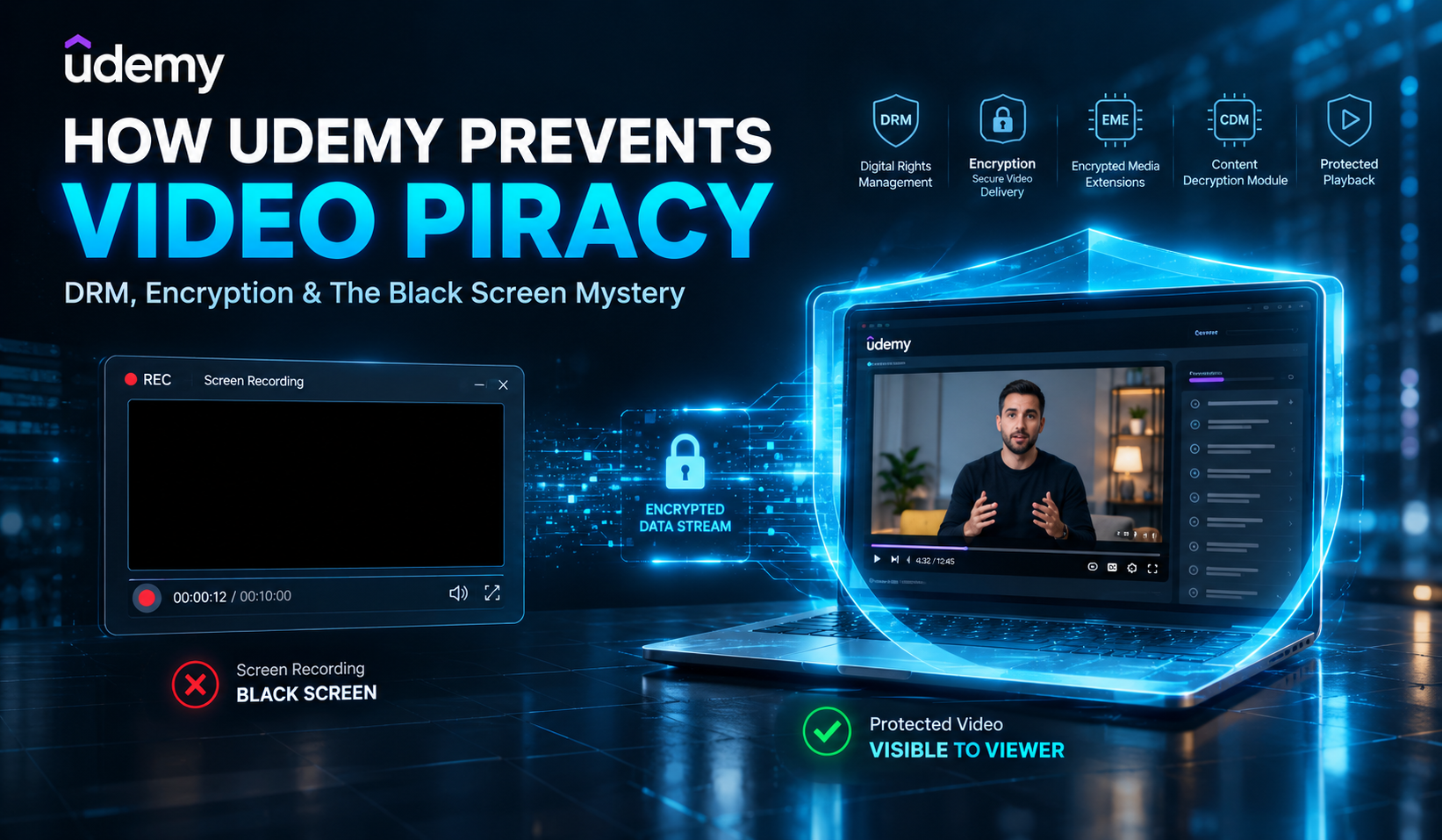
You press Play.
The Udemy lecture starts normally. The instructor is explaining something on screen, the video is crystal clear, and everything looks completely ordinary.
Then you open a screen recorder.
You hit Record.
The instructor keeps talking.
But later, when you open the recording...
The video is black.
The audio is there. Your browser is working. The course itself played perfectly in front of your eyes.
So what happened?
How can you see the video, while another application apparently can't?
That strange little black rectangle opens the door to a much bigger story about encrypted media, browsers, operating systems and digital rights management.
And the interesting part is that the technology isn't necessarily trying to stop you from watching.
It's trying to make sure that watching and freely copying aren't the same thing. 🔐
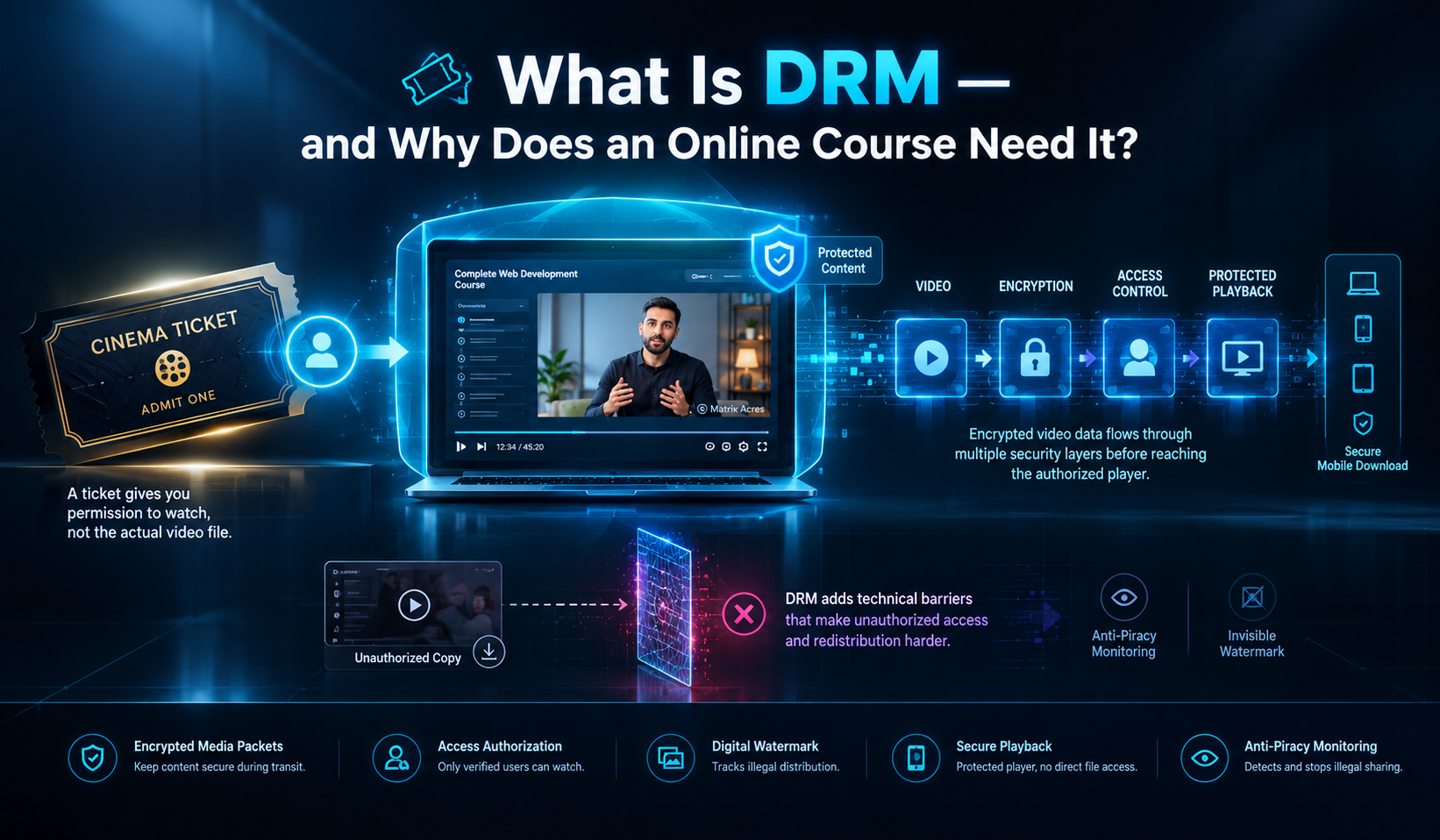
🎟️ What Is DRM - and Why Does an Online Course Need It?
Think about a cinema ticket.
You pay for the right to watch a movie.
But that ticket doesn't give you the movie file. It doesn't give you the studio's master copy. And it certainly doesn't give you permission to distribute thousands of copies of the film.
Digital content has a similar problem.
Online courses can represent hundreds of hours of work from instructors: lectures, demonstrations, coding sessions, diagrams, projects and carefully produced explanations.
Once an unrestricted video file is copied, however, it can potentially be uploaded somewhere else and redistributed.
That's where Digital Rights Management (DRM) enters the picture.
DRM refers broadly to technologies that help content providers control how protected digital media is accessed and played.
But here's the first misconception worth clearing up:
DRM is not an invisible force field around a video.
It doesn't make copying physically impossible.
Instead, it adds technical barriers around the content.
For Udemy, some of these protections are publicly documented.
Udemy says instructors can control whether course lectures are downloadable on computers. It also says that videos downloaded through its mobile apps are encrypted and can only be accessed through the app.
Udemy also states that it uses anti-piracy technology, including encoding videos through its proprietary player and adding a Udemy watermark to videos. It says it works with anti-piracy vendors to detect and remove unauthorized copies from sites such as cyberlockers and torrents.
So the goal isn't necessarily:
"Nobody can ever copy this."
The practical goal is closer to:
Make unauthorized access and redistribution significantly harder while keeping legitimate playback convenient.
And that distinction matters.
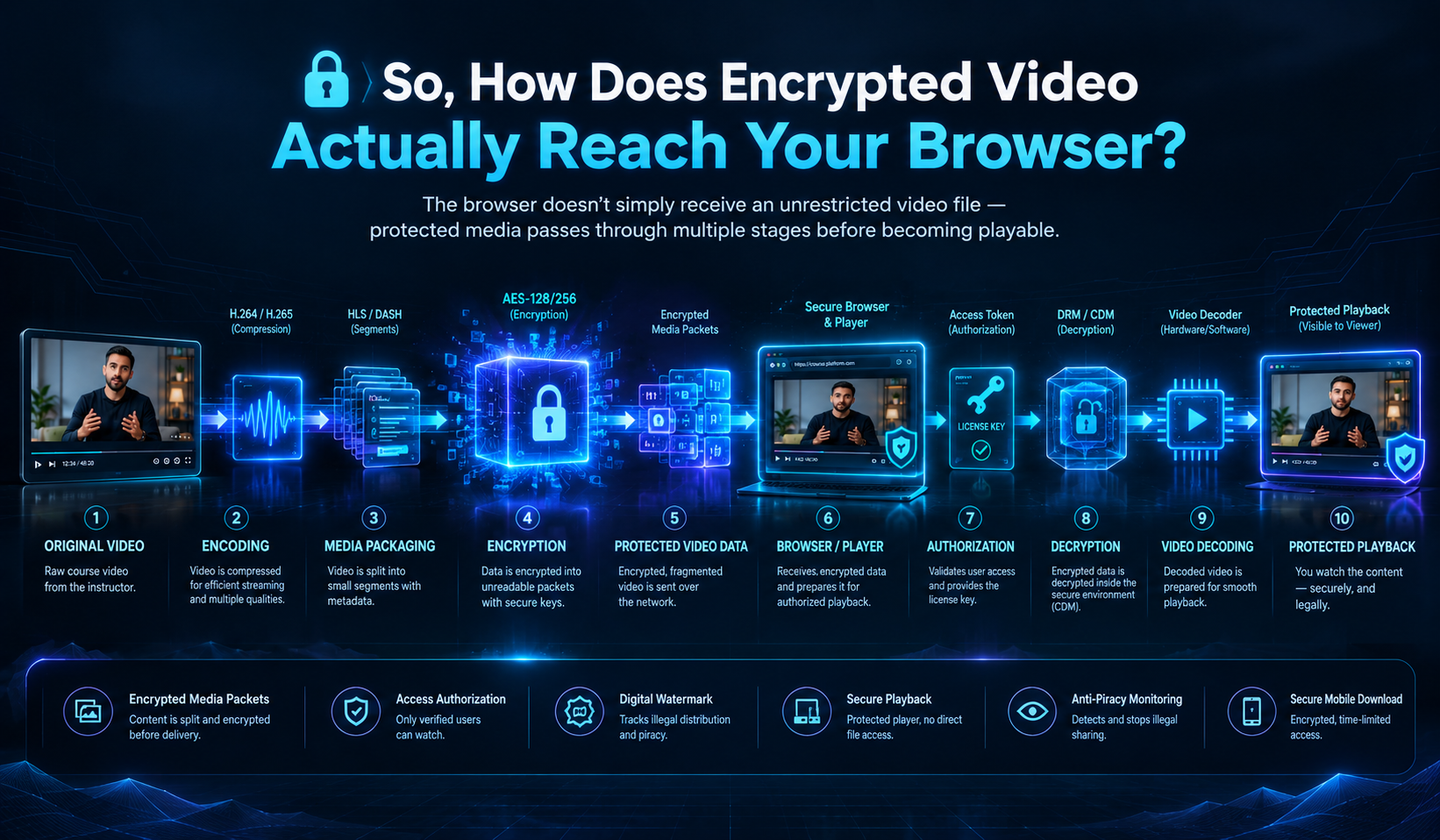
🔒 So, How Does Encrypted Video Actually Reach Your Browser?
Here's where the ordinary-looking Play button starts hiding some serious engineering.
When you watch a normal web video, you might imagine that the browser simply receives one video file, decodes it and displays it.
Protected media can be more complicated.
A typical protected-video architecture can involve encoding the original footage, packaging it for streaming, encrypting the media and then delivering the protected content to a compatible player.
The browser or application may then communicate with an authorization or licensing system before the protected content can be decrypted and played.
A simplified version looks like this:
             Original Course Video
                      ↓
              Video Encoding
                      ↓
             Media Packaging
                      ↓
                Encryption
                      ↓
            Protected Video Data
                      ↓
            Browser / App Player
                      ↓
          Authorization / License
                      ↓
         Content Decryption System
                      ↓
               Video Decoding
                      ↓
            Protected Playback
                      ↓
                  You watch
The exact architecture differs between services and platforms.
There isn't one universal DRM pipeline that every streaming company follows.
But the central idea is fascinating:
The video you're watching doesn't necessarily have to exist on your machine as an ordinary, unrestricted video file.
That's the first major piece of the puzzle.
🌐 Your Browser Has a Role in Protected Video Playback
You might assume that a website simply downloads an encrypted video and JavaScript handles everything.
That's not quite how modern protected media has to work.
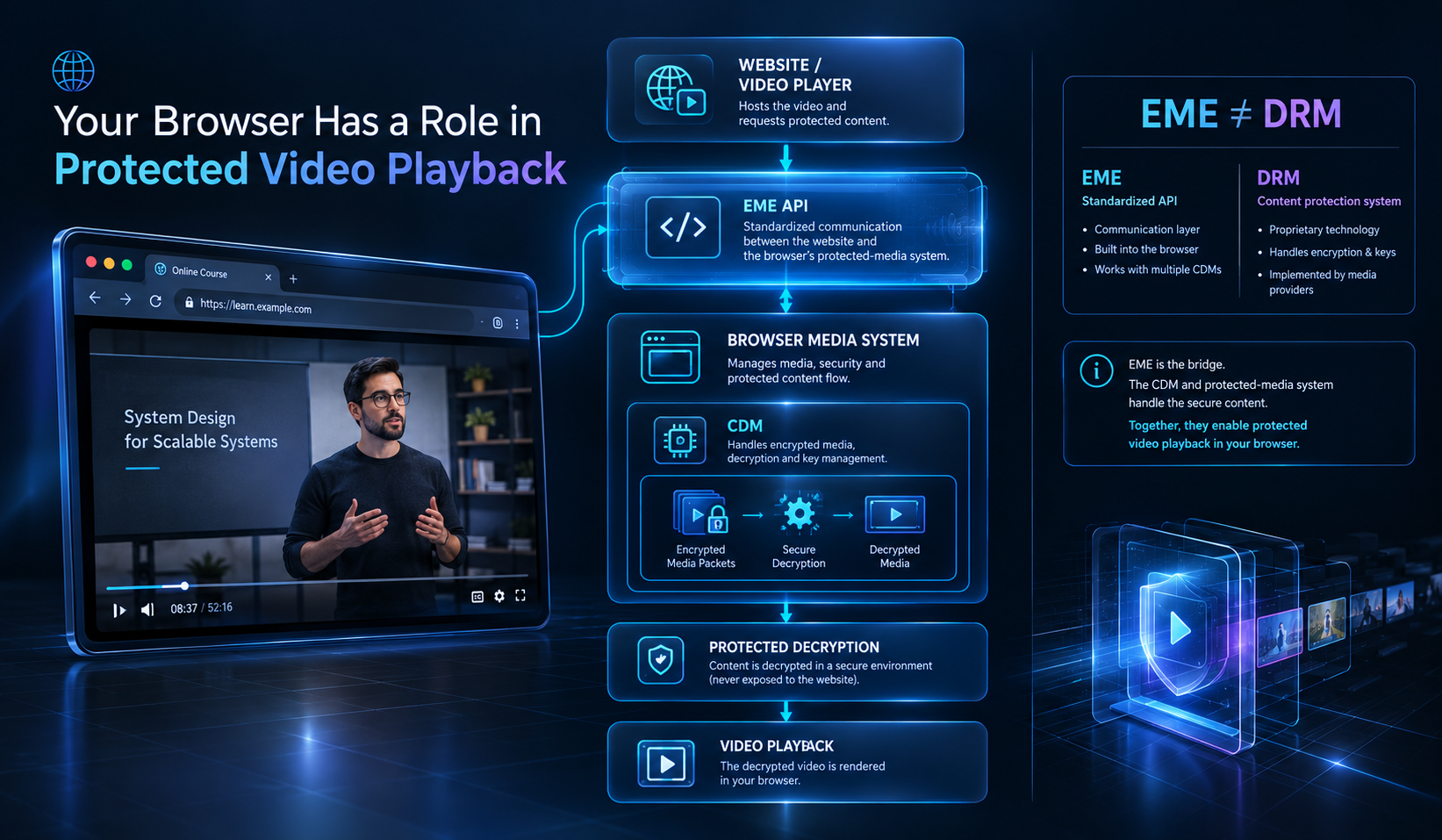
One important piece of the puzzle is Encrypted Media Extensions (EME).
EME is a W3C web API that allows websites to interact with a browser's content-decryption capabilities for encrypted media.
And here's the crucial detail:
EME itself is not a DRM system.
The W3C specification explicitly says that EME defines a common API for discovering, selecting and interacting with content-protection systems; it does not itself define a particular DRM technology.
This distinction is easy to miss.
Think of EME as a standardized communication layer between a web application and the browser's supported protected-media system.
That system can involve a Content Decryption Module (CDM).
A simplified relationship looks like this:
       Website / Video Player
                 ↓
              EME API
                 ↓
       Browser Media System
                 ↓
                CDM
                 ↓
       Protected Decryption
                 ↓
           Video Playback
The W3C specification defines a CDM as a client component that provides functionality—including decryption—for one or more key systems. It also describes how key sessions and license-related information can be handled during protected playback.
In other words, your browser isn't necessarily just a passive window displaying a file.
It can become part of the security architecture surrounding that file.
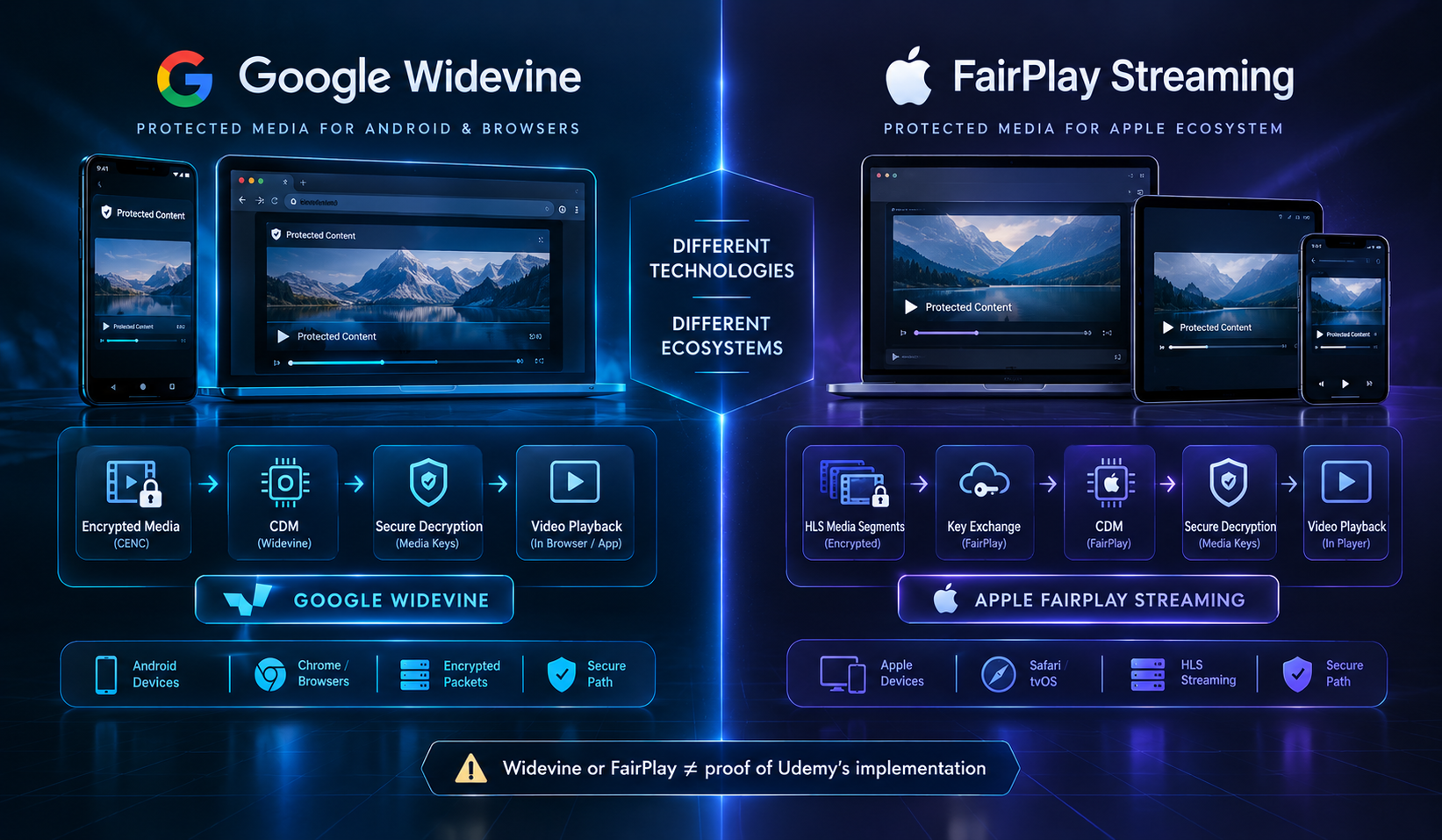
⚔️ Widevine vs FairPlay: Two Names You'll Keep Hearing
If you've ever looked into Netflix, YouTube or other premium streaming platforms, you've probably encountered two names:
Google Widevine and Apple FairPlay Streaming.
They both belong to the protected-media world, but they aren't the same technology.
| Technology | Ecosystem | Broad purpose |
|---|---|---|
| Google Widevine | Android, supported browsers and other integrated platforms | Protect premium digital media and support controlled playback |
| Apple FairPlay Streaming | Apple platforms and HLS-based streaming workflows | Encrypt, securely deliver and protect playback of streaming media |
Google describes Widevine as its content-protection system for premium media. Its documentation also shows Widevine working with technologies including Encrypted Media Extensions and Common Encryption.
Apple describes FairPlay Streaming as technology for securely delivering streaming media over HTTP Live Streaming, including encryption, key exchange and protected playback on Apple platforms.
But here's where technical articles often make an unsupported leap.
It would be tempting to say:
"Udemy uses Widevine."
Or:
"Udemy uses FairPlay."
But the existence of these technologies doesn't prove that Udemy uses one particular DRM system across every course, browser, device and playback environment.
That's an important distinction.
We can confidently explain what Widevine and FairPlay are.
We can discuss how protected streaming generally works.
But we shouldn't invent Udemy's private implementation details simply because another streaming platform uses them.
Good technical writing knows the difference between documented fact and reasonable assumption.
👀 Now for the Black Screen Mystery
Let's go back to that screen recording.
The video is playing.
Your eyes can see it.
But the recording contains a black rectangle.
How?
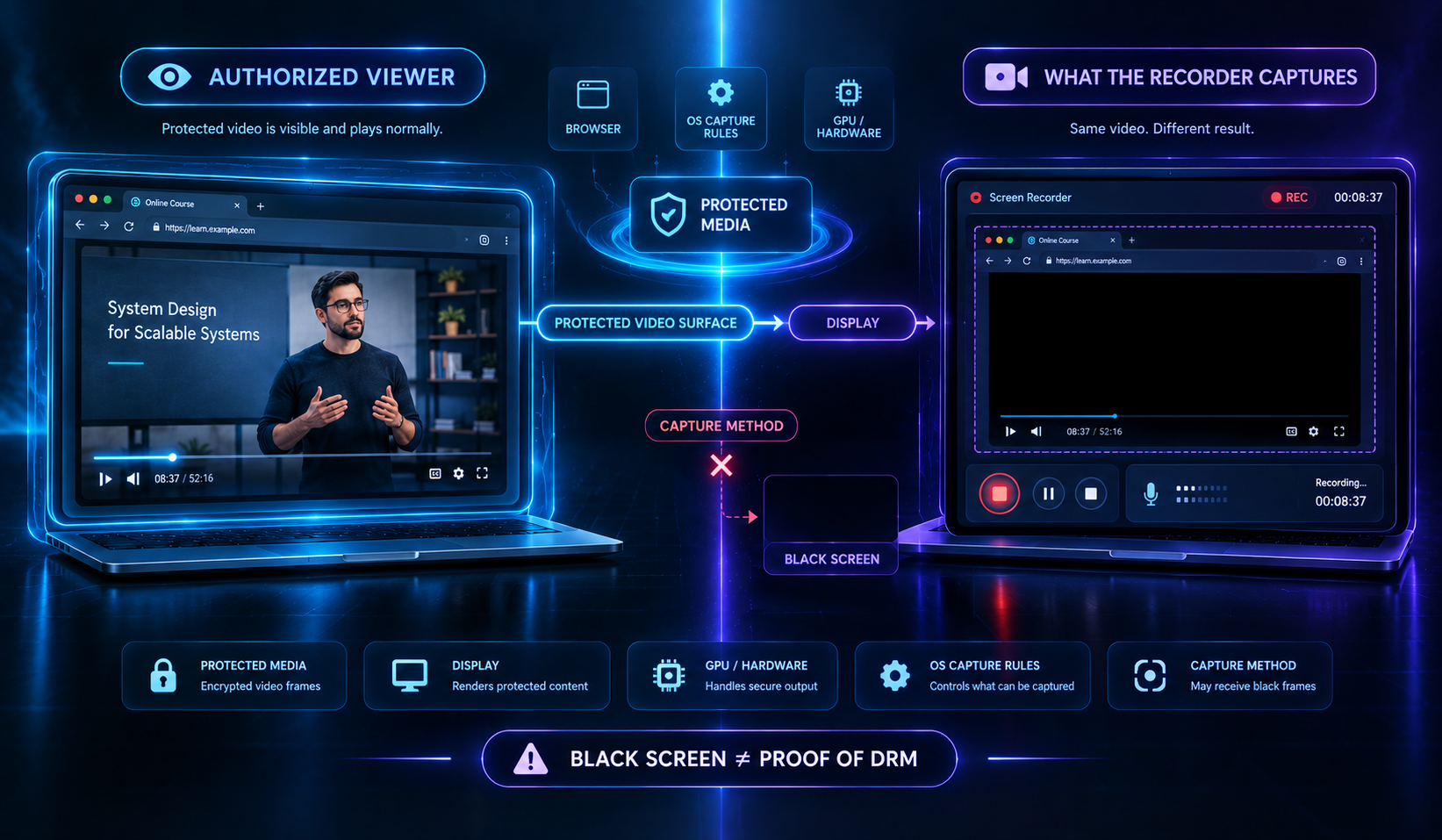
In some protected-playback configurations, video can be rendered through security-controlled paths that limit how protected content can be captured.
The exact behavior can depend on several things:
Operating-system capture rules
Browser implementation
Hardware capabilities
Protected-media security levels
Graphics and rendering architecture
The screen-recording application's capture method
The important concept is this:
The frames displayed to an authorized viewer don't necessarily have to be equally accessible to every application attempting to capture them.
That's why you can get a situation that looks almost impossible:
             YOUR DISPLAY
                  ↓
       ┌────────────────────┐
       │   Browser Window   │
       │                    │
       │      VIDEO         │
       │     Playing        │
       │     Normally       │
       └────────────────────┘
                  ↓
          Screen Recorder
                  ↓
       ┌────────────────────┐
       │   Browser Window   │
       │                    │
       │   ██████████████   │
       │   █ BLACK VIDEO █  │
       │   ██████████████   │
       └────────────────────┘
It feels strange because we normally think of our monitor as one giant grid of pixels.
Modern graphics pipelines are more complicated than that.
A protected video surface can be handled differently from ordinary application UI.
But there's another important warning:
A black screen does not automatically prove that DRM is responsible.
GPU acceleration, graphics drivers, browser issues and recording-software compatibility can also produce black video.
So if a recording contains a black rectangle, you cannot conclusively identify the cause from that symptom alone.
The black screen is a clue - not forensic proof.
💧 DRM Isn't the Only Layer: Enter Watermarking
Suppose someone somehow obtains and redistributes a recording anyway.
What happens then?
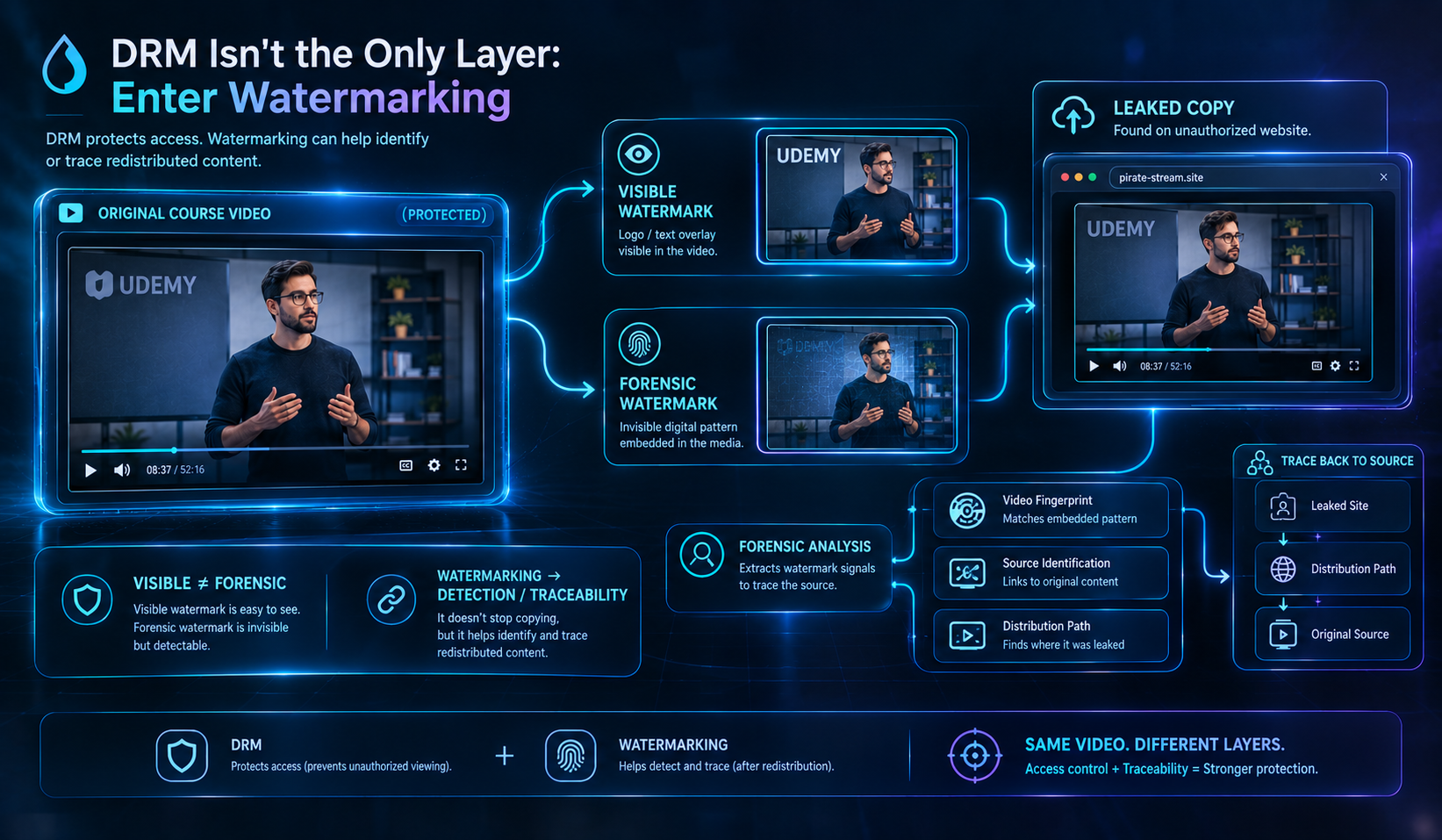
This is where watermarking becomes interesting.
You've probably seen a visible watermark before: a logo, username or text displayed over a video.
But watermarking doesn't always have to be obvious.
A service may use information associated with a session or distribution path to help identify the source of a leaked copy.
Then there is forensic watermarking.
The basic idea is to embed identifying information into media in ways designed to survive certain transformations.
If a copy later appears somewhere unauthorized, analysis may potentially help determine where it originated.
But we need to be precise here.
A visible watermark isn't automatically forensic watermarking.
A forensic watermark isn't necessarily visible.
And a watermark identifying a session isn't necessarily the same thing as a watermark that identifies an individual person.
These are different techniques with different goals.
For Udemy specifically, the company publicly states that its videos carry a Udemy watermark and that it uses anti-piracy technology and external anti-piracy vendors.
However, that public statement shouldn't be stretched into a claim that every Udemy course uses a particular invisible forensic-watermarking technology.
Again, the distinction between what is documented and what is merely possible matters.
🎬 The Security Behind a Simple Play Button
Now let's return to the black screen.
Why can you watch a video while a recording sometimes captures only black?
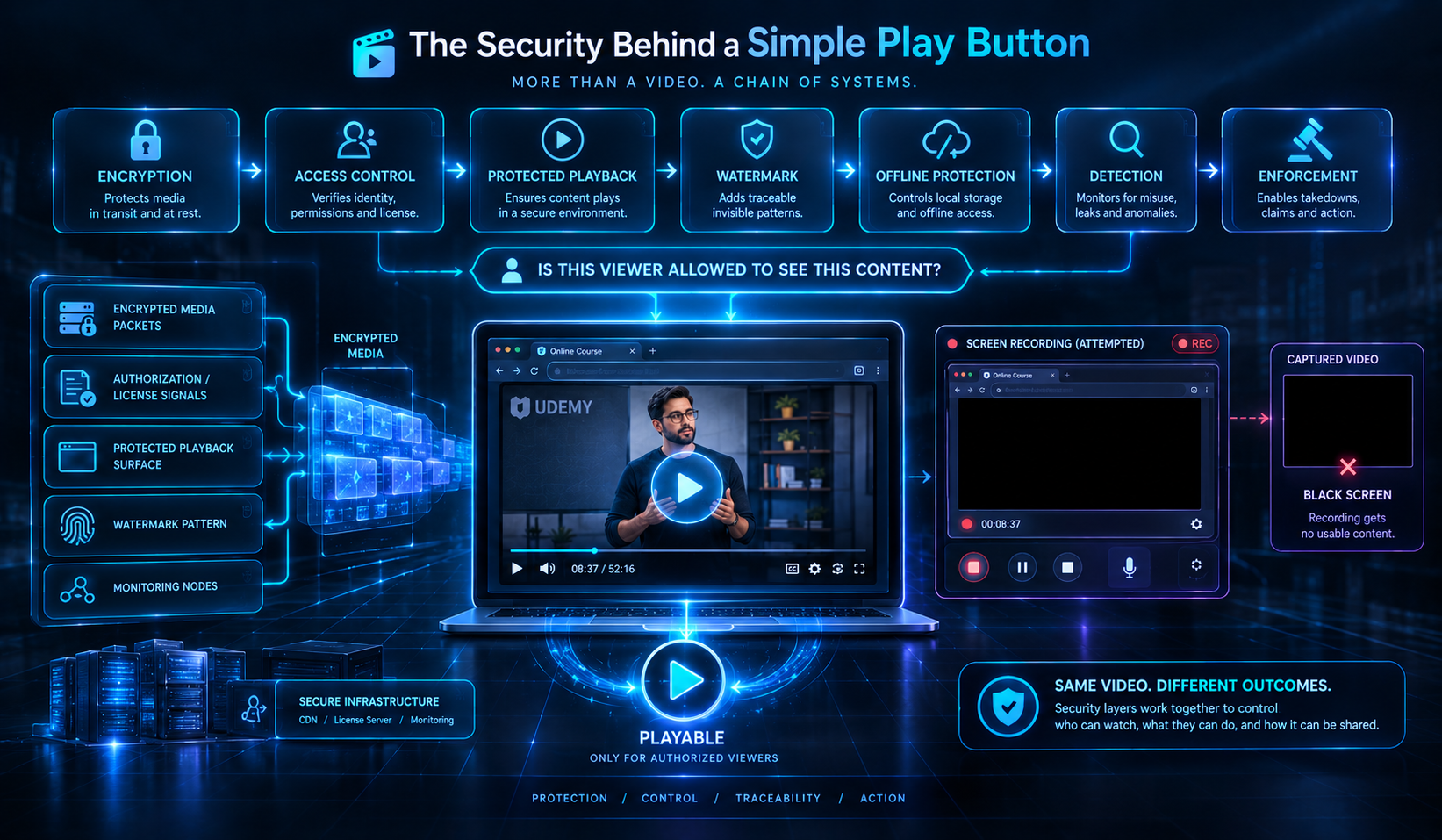
In a protected playback environment, the browser, content-decryption system and operating system can enforce restrictions that prevent a particular capture mechanism from receiving the protected video frames.
But the precise behavior depends on the platform and implementation.
And importantly, Udemy's public documentation does not provide enough information to reconstruct every detail of its internal browser-video DRM architecture.
What Udemy does publicly document is already interesting enough.
The company says it uses anti-piracy technology, processes uploaded videos through a proprietary player, adds a Udemy watermark, restricts some computer downloads, and encrypts videos downloaded for offline viewing in its mobile applications.
Udemy also notes that some downloaded mobile content can expire after 30 days and require an internet connection to regain access.
So the story isn't really about one magical piece of DRM.
It's about layers.
Encryption.
Access controls.
Protected playback.
Watermarking.
Offline restrictions.
Detection.
Enforcement.
All of them can contribute to making unauthorized redistribution more difficult.
And that's the fascinating part.
The next time you press Play, you're not simply asking a website to send you a video.
You're asking an entire chain of systems to answer a more complicated question:
"Is this viewer allowed to see this content—and under what conditions?"
The video player makes that process look effortless.
That's the trick.
Behind a simple play button can be an entire security architecture designed to keep licensed content useful to legitimate learners while making unauthorized copying considerably harder. 🔐
Modern video delivery isn't just about sending pixels to a screen. It's about controlling how those pixels become accessible in the first place.
If you enjoy practical stories explaining the technology behind everyday digital experiences, follow Lakshay Dhoundiyal for more practical Tech & Cybersecurity stories.
About the author
- I am a Software Engineer and Cybersecurity Researcher with over 4.5 years of hands-on experience through internships and freelance work. I specialize in building scalable, high-performance web applications and designing secure, reliable systems. As a record holder recognized by the International Book of Records and India Book of Records, I share technical knowledge through blogs, reaching a professional network of 26K+ followers. On Hashnode, I share insights and practical experiences in software engineering and cybersecurity.
Comments
Join the discussionNo comments yet. Be the first to comment.