The Hidden Distributed System Behind YouTube’s “Continue Watching” Button 🎬⚙️
How YouTube saves your playback progress, syncs it across devices, and makes one tiny timestamp feel like magic
Imagine this.
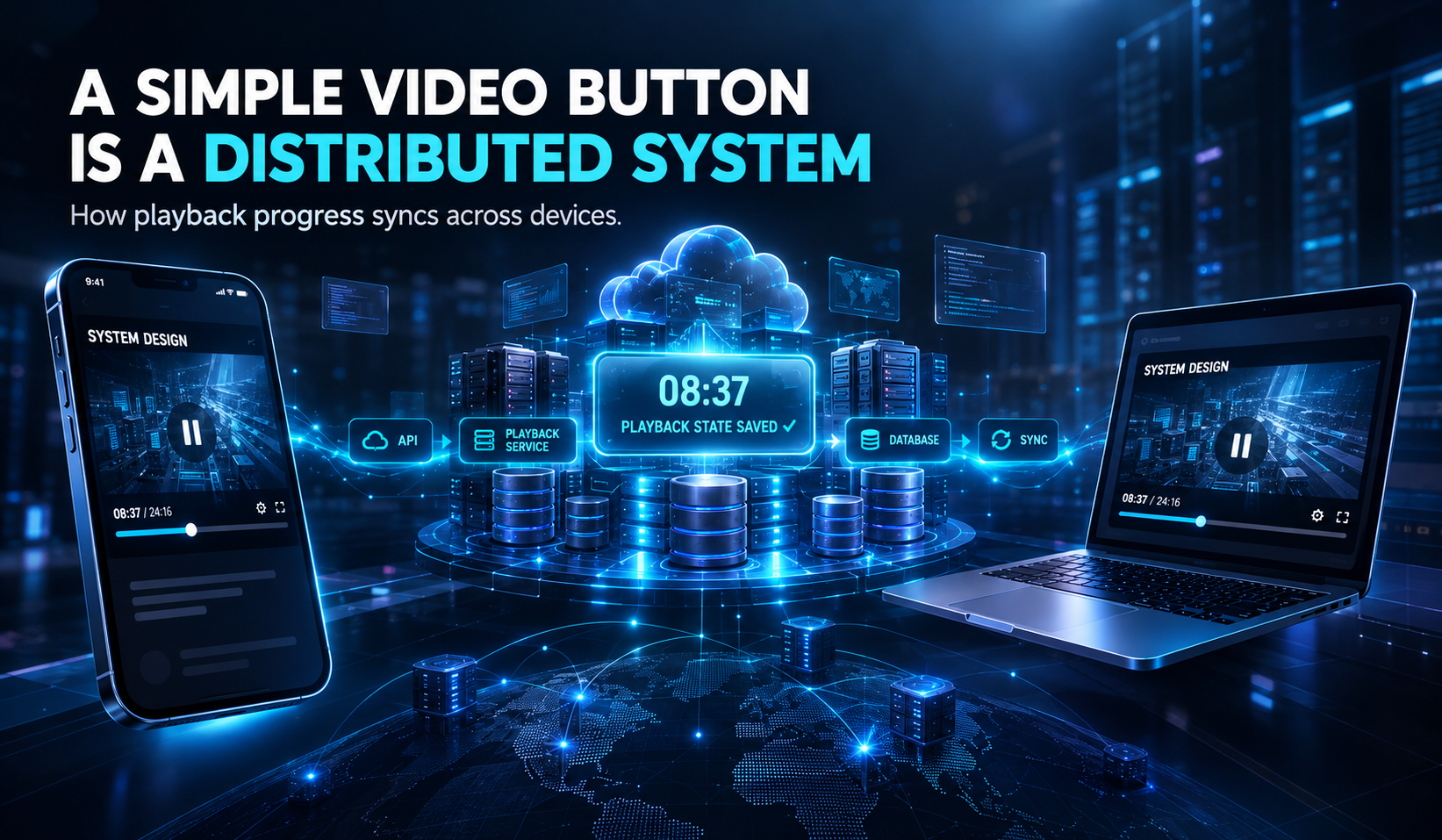
You’re watching a YouTube video about system design. The explanation is getting interesting. The speaker has just started discussing database sharding.
You pause the video at 08:37.
Life happens. You close your phone, open your laptop, visit YouTube, and select the same video.
And there it is.
The video continues from almost exactly where you stopped. 😮
No searching. No dragging the progress bar. No trying to remember the timestamp.
Just one click.
It feels like YouTube remembers what you were doing.
But here’s the interesting question:
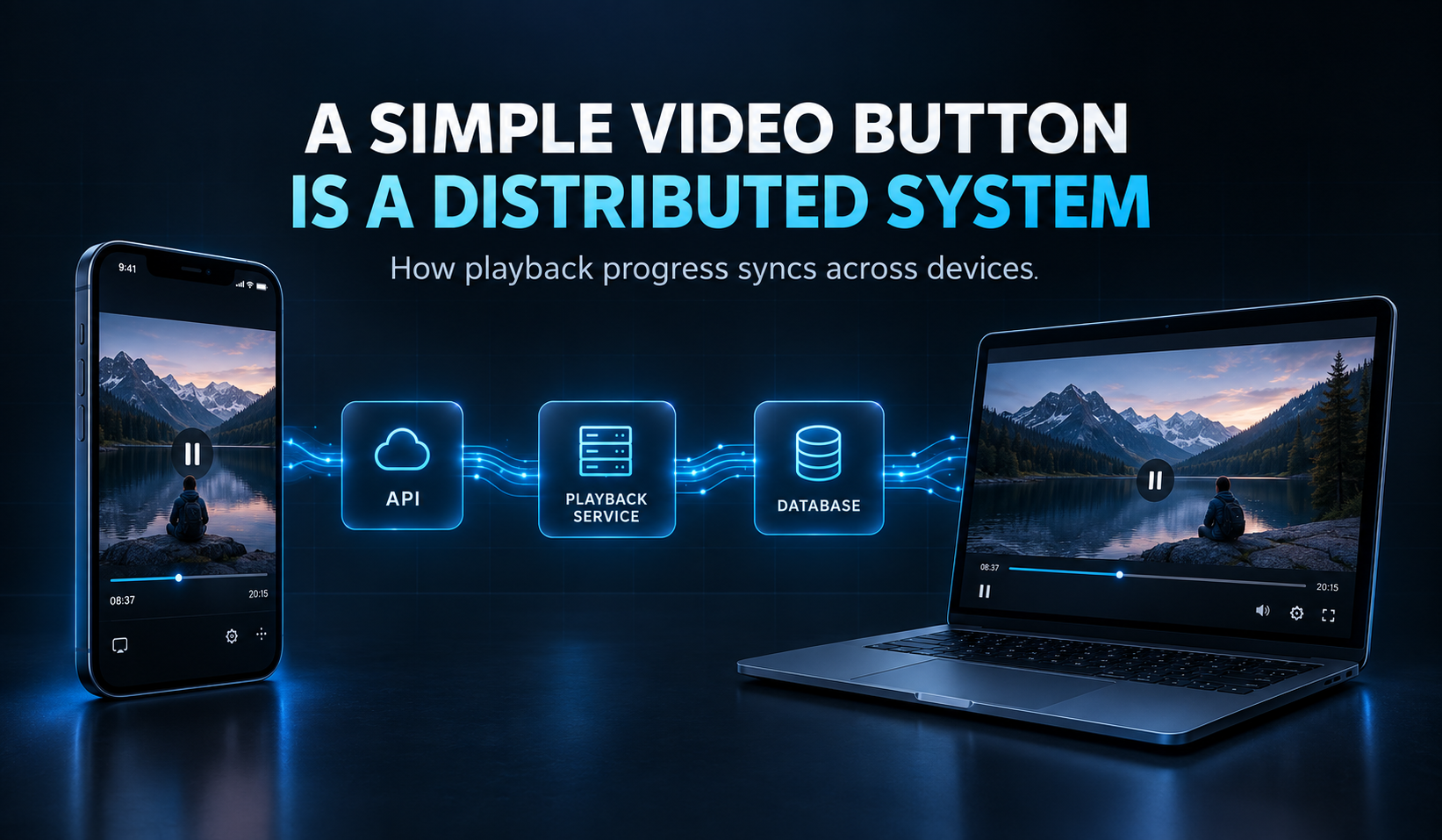
How does a video-watching website remember a tiny timestamp across different devices, servers, and millions of users?
That simple “Continue Watching” experience hides a fascinating backend engineering problem.
Behind the scenes, there is a combination of APIs, databases, authentication, synchronization, scalability, and reliability. 🔐☁️
In other words, a feature that looks like a button is actually a small example of distributed systems in action.
Let’s take a look at the technology behind it. 🚀
PS: This article explains a simplified, educational model of playback-progress synchronization. YouTube’s actual internal architecture is proprietary, so the components and flows below are conceptual, not confirmed internal implementation details.
What Actually Happens When You Pause a YouTube Video? ⏸️🎥
Let’s start with the simplest possible explanation.
When you watch a video, the player knows where you are in the timeline.
For example:
User: user_231
Video: video_987
Position: 08:37
When you pause, the application may send playback-progress information to a backend service.
The backend associates that progress with your account and the video. The state is then stored so it can be retrieved later.
When you open the same video on another device, that device can request the saved playback position.
The simplified journey looks like this:
Watch Video
    ↓
Player Tracks Progress
    ↓
Progress Sent to Backend
    ↓
Playback State Stored
    ↓
Another Device Requests State
    ↓
Video Continues
That’s the basic idea.
The difficult part is making this work reliably for a huge number of users, even when networks fail, devices change, and multiple requests arrive at the same time. ⚡
The First Step: Your Player Sends Data to the API 📱🔗
Before discussing databases, we need to understand the API.
An API, or Application Programming Interface, is a way for software components to communicate.
In this scenario, the video player needs to communicate with backend services.
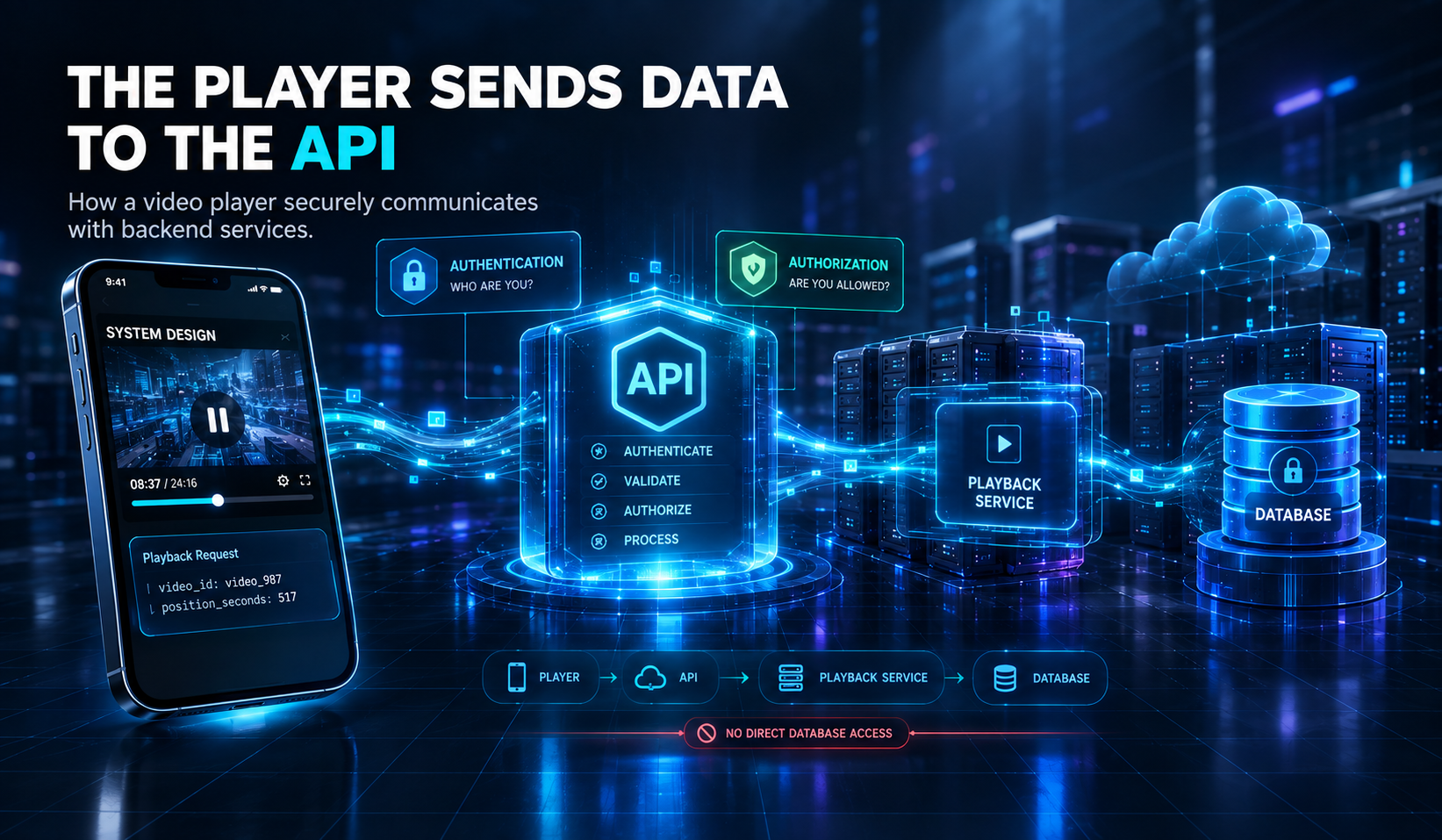
A simplified flow might look like:
PLAYER → API → BACKEND
Think of an API as a waiter in a restaurant. 🍽️
You tell the waiter what you want. The waiter takes your request to the kitchen. The kitchen processes it and returns the result.
Similarly, the video player sends a request, and the backend handles the work.
A conceptual playback-progress request could contain:
{
  "video_id": "video_987",
  "position_seconds": 517
}
The backend may also receive information associated with the authenticated user and the playback session.
The important point is that the client should not directly write to the database.
Why?
🔐 Anyone could attempt to change another user’s progress.
🛡️ The application would have less control over validation.
💾 Database credentials would need to be exposed to clients.
⚙️ Business rules would become difficult to enforce.
🚨 Malicious requests could damage or overload the database.
Instead, the API acts as a controlled entry point.
It can authenticate the user, validate the request, apply business logic, and then interact with the storage layer.
Authentication vs Authorization 🔑
Authentication answers:
“Who is making this request?”
Authorization answers:
“Is this user allowed to access or modify this playback state?”
Both matter when personal viewing history is involved.
The Backend Needs to Know What to Remember 🧠💾
A timestamp alone is not enough.
Imagine the backend receives:
Position: 517 seconds
517 seconds of what?
Your favorite music video? A programming tutorial? A documentary? 🎵💻🎬
The backend needs context.
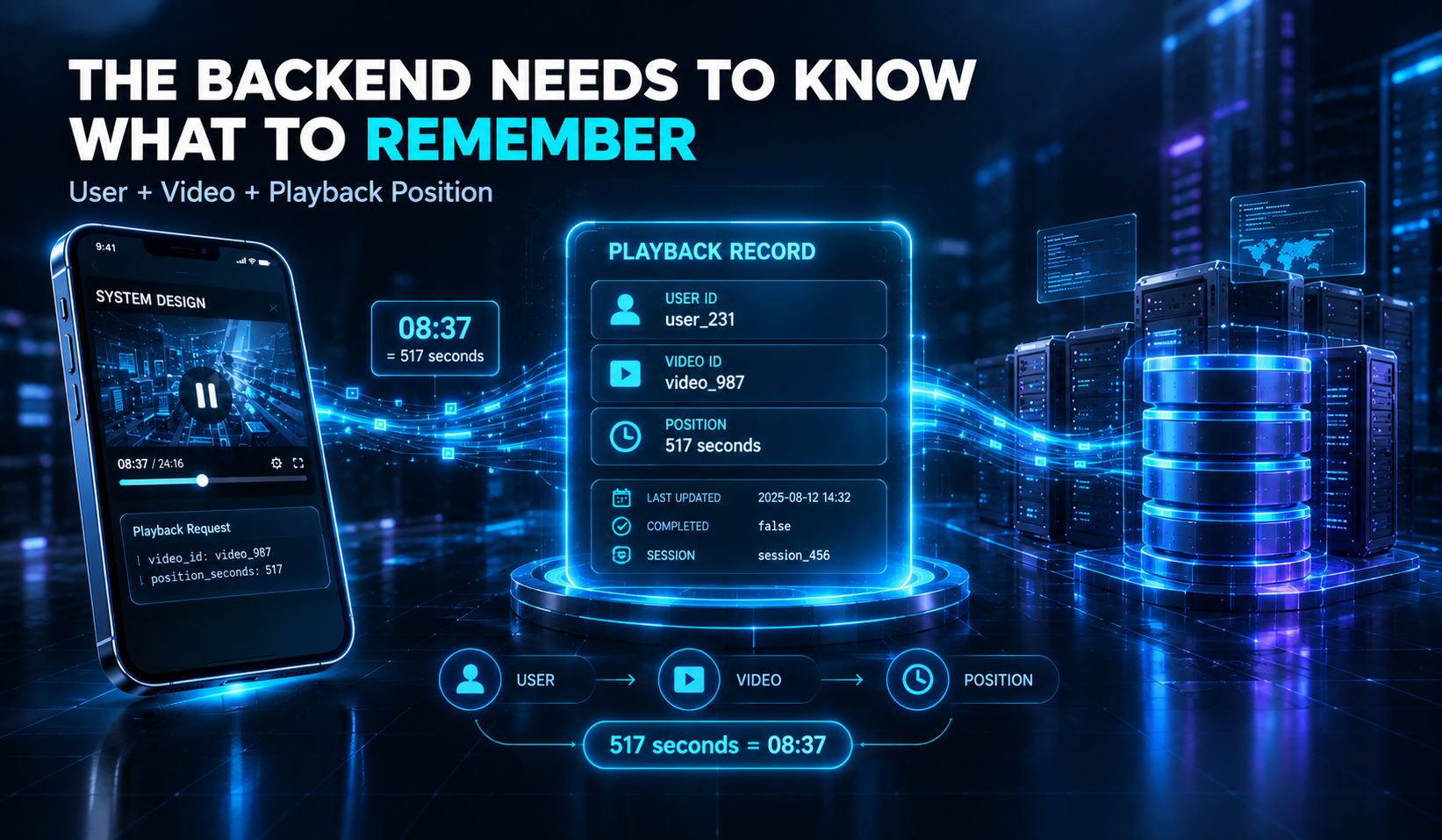
A conceptual playback record contains three essential pieces of information.
User ID 👤
Identifies whose playback progress is being stored.
user_231
Video ID 🎥
Identifies the video being watched.
video_987
Playback Position ⏱️
Identifies where the viewer stopped.
517 seconds
517 seconds equals 8 minutes and 37 seconds.
A simplified record might look like this:
{
  "user_id": "user_231",
  "video_id": "video_987",
  "position": 517
}
But a production-quality system needs more than these three fields.
It may also need information such as:
When the progress was last updated. 🕒
Whether the video was completed. ✅
Playback-session information.
Data needed for validation or ordering.
Other metadata required by the application.
The exact schema depends on the system’s requirements.
The core idea is simple:
The backend must know which user watched which video and where they stopped.
Where Is Your Playback Progress Stored? 🗄️☁️
Now we reach the storage layer.
A database is responsible for storing and retrieving information reliably.
For a playback-progress feature, the system needs persistent storage.
Why persistent?
Because your progress should not disappear simply because:
📱 You close the app.
🔄 Your phone restarts.
💻 You switch to another device.
🖥️ A backend server is replaced.
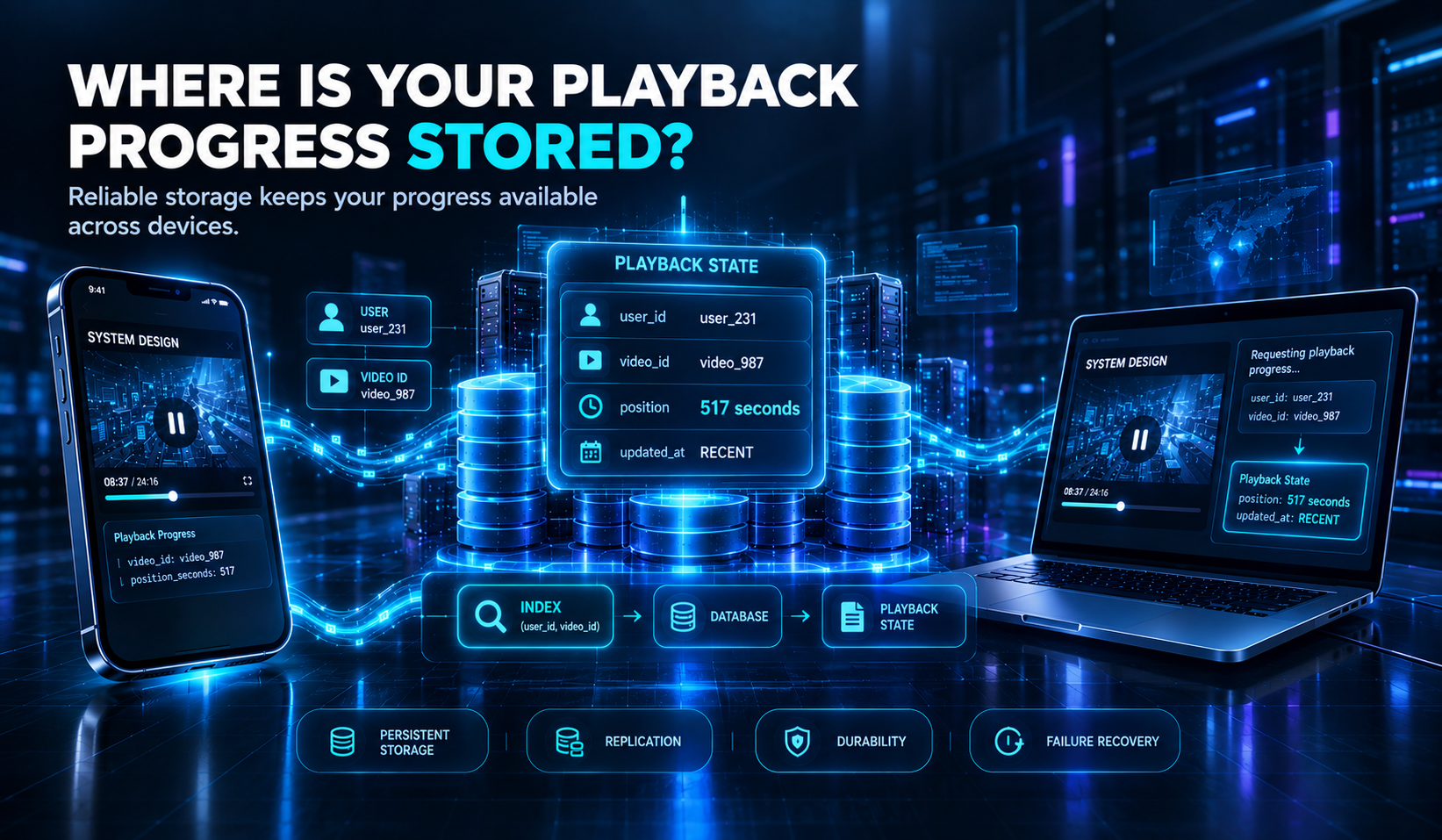
A conceptual database table could look like this:
PlaybackState
-------------
user_id
video_id
position_seconds
updated_at
A record might look like this:
| user_id | video_id | position_seconds | updated_at |
|---|---|---|---|
| user_231 | video_987 | 517 | Recent timestamp |
When your laptop opens the video, the backend can use the authenticated user and video ID to find the relevant playback state.
Why Indexing Matters ⚡🔍
Imagine a database containing playback records for millions of users.
Searching every record to find one user’s progress would be inefficient.
An index can help the database locate relevant records more quickly.
For example, a conceptual lookup could use:
(user_id, video_id)
This helps identify the playback record associated with a particular user and video.
In real systems, database design must also consider:
Read and write performance.
Storage growth.
Data durability.
Index maintenance.
Replication.
Failure recovery. 🛡️
The exact database technology used by YouTube for this feature is not established here.
The important lesson is that playback state needs a reliable storage layer.
The Real Challenge: Millions of Users, Millions of Updates ⚡🌍
Saving one timestamp sounds easy.
Now imagine doing it for a massive video platform.
Millions of viewers are watching videos.
Some are pausing.
Some are seeking forward.
Some are switching devices.
Some are closing the app.
And many are doing these things at the same time.
The system must handle a continuous stream of playback-related requests.
A Simple Numerical Example 📊
Let’s imagine:
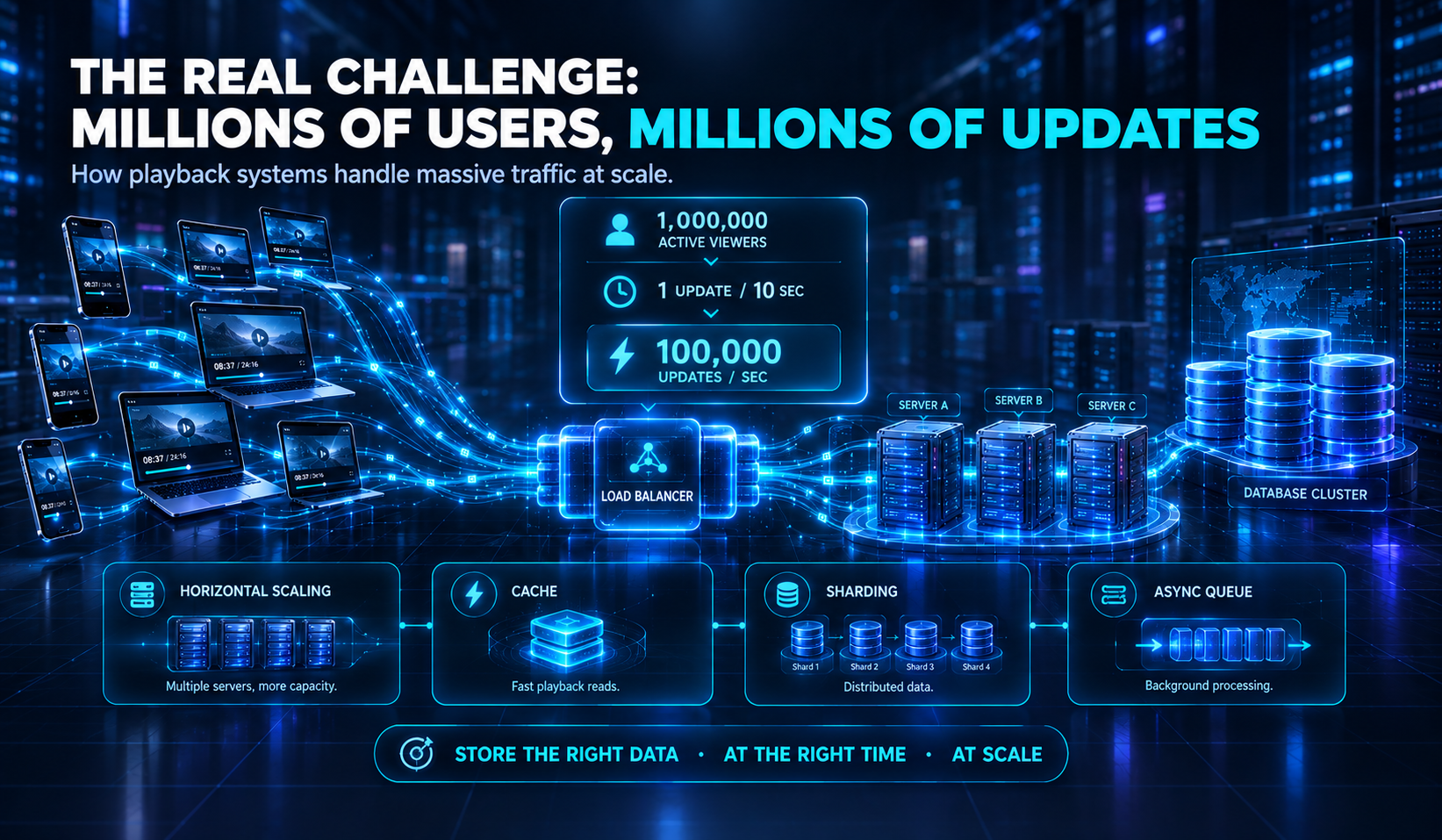
1,000,000 active viewers.
Each viewer sends one progress update every 10 seconds.
This is an illustrative estimate, not actual YouTube traffic.
The calculation is:
$$\frac{1{,}000{,}000}{10} = 100{,}000$$
That means approximately:
100,000 progress updates per second. 😳
And this is only a simplified example involving one million viewers.
Real systems have different traffic patterns, batching strategies, client behavior, and backend designs. Not every viewer necessarily sends updates at the same frequency.
Still, the example reveals the challenge.
A single database server may not be sufficient for a workload of this scale.
How Can the System Scale? 🚀
Horizontal Scaling 🖥️🖥️🖥️
Instead of relying on one powerful server, the application can run across multiple servers.
             ┌──────────────┐
             │ Load Balancer│
             └──────┬───────┘
                    │
          ┌─────────┼─────────┐
          ▼         ▼         ▼
       Server A  Server B  Server C
A load balancer distributes incoming requests across available backend servers.
If one server becomes overloaded, other servers can handle additional traffic.
Caching ⚡🧠
Frequently accessed playback state may benefit from caching.
A cache stores data temporarily so it can be retrieved quickly.
For example:
Request Playback State
          ↓
        Cache
       ↙     ↘
   Found     Not Found
     ↓          ↓
  Return     Database
             Lookup
Caching can reduce repeated database reads, although the cache must be designed carefully to avoid returning stale or incorrect state.
Partitioning and Sharding 🗂️
A large dataset can be divided into smaller portions.
For example, playback records might be distributed according to a partitioning strategy involving user IDs.
This can help spread storage and workload across multiple database nodes.
Asynchronous Processing 🔄
Some work does not need to block the user’s experience.
A system might process selected playback updates asynchronously using a queue or messaging system.
However, not every update should automatically be made asynchronous.
The design depends on how quickly the product needs progress to become available and how much data loss is acceptable.
This is where backend engineering becomes interesting.
The goal is not simply to store data.
The goal is to store the right data, at the right time, at scale. ⚙️
How Does Cross-Device Synchronization Work? ☁️📱💻
Now let’s return to our original story.
You paused on your phone at 08:37.
You open your laptop.
How does the laptop know?
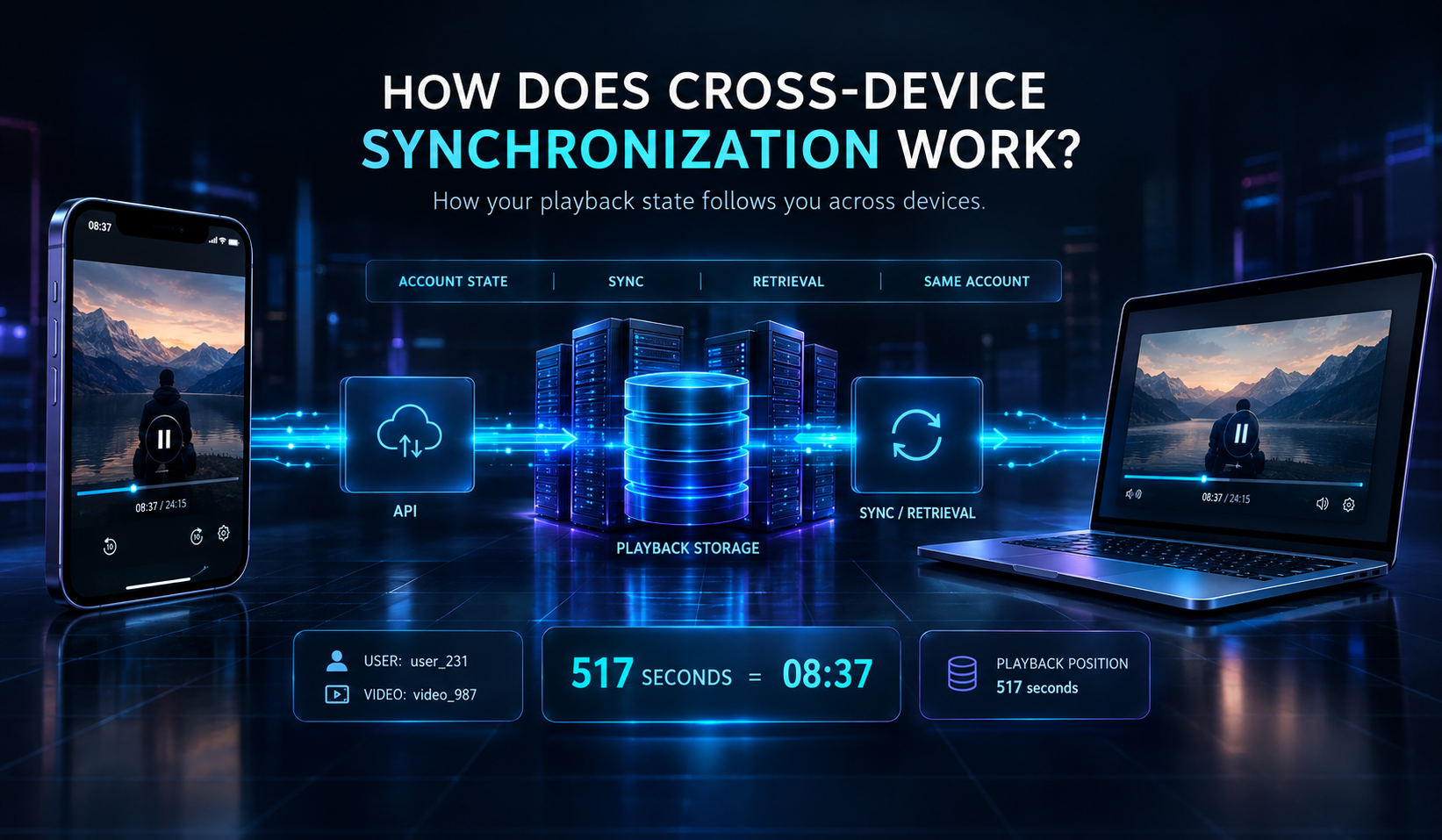
A simplified flow looks like this:
PHONE
  ↓
API
  ↓
PLAYBACK STORAGE
  ↓
SYNC / RETRIEVAL
  ↓
LAPTOP
Here is the step-by-step journey.
The Phone Sends Progress 📱
The video player tracks your playback and sends progress information to the backend.
The Backend Stores the State 💾
The backend associates the progress with your account and the video.
You Open the Laptop 💻
You sign in to the same account.
The laptop has its own local video player, but it can access account-level playback state through the backend.
The Laptop Requests Progress 🔍
The application asks the backend for the relevant playback state.
Conceptually:
User: user_231
Video: video_987
The Backend Returns the Saved Position ⏱️
The backend returns a valid playback position, such as:
517 seconds
The Player Continues Watching ▶️
The laptop’s video player seeks to the returned position.
You continue watching.
The key difference is:
Local playback state belongs to a device or session. Account-level playback state can be retrieved across devices.
The exact synchronization rules depend on the product’s implementation.
What If Two Devices Update the Same Video? ⚔️🔄
This is where the system becomes even more interesting.
Imagine you are watching the same video on two devices.
Your phone pauses at:
08:37
Meanwhile, your laptop continues playing and reaches:
12:10
Both devices may send updates to the backend.
Which timestamp should win? 🤔
This is a classic distributed-systems challenge.
Race Conditions 🏁
A race condition can happen when multiple operations access or modify shared state, and the final result depends on the order in which they execute.
For example:
Phone   → Save 08:37
Laptop  → Save 12:10
If the phone’s request arrives later because of network delay, a simplistic last-write-wins approach might accidentally overwrite the newer playback position with an older one.
That could cause the user to continue from the wrong point.
This is an important system-design lesson:
When multiple devices modify the same data, “just save the latest value” may not be enough.
Enjoyed this system-design story? Follow Lakshay Dhoundiyal for more practical backend engineering, distributed systems, and technology explainers.